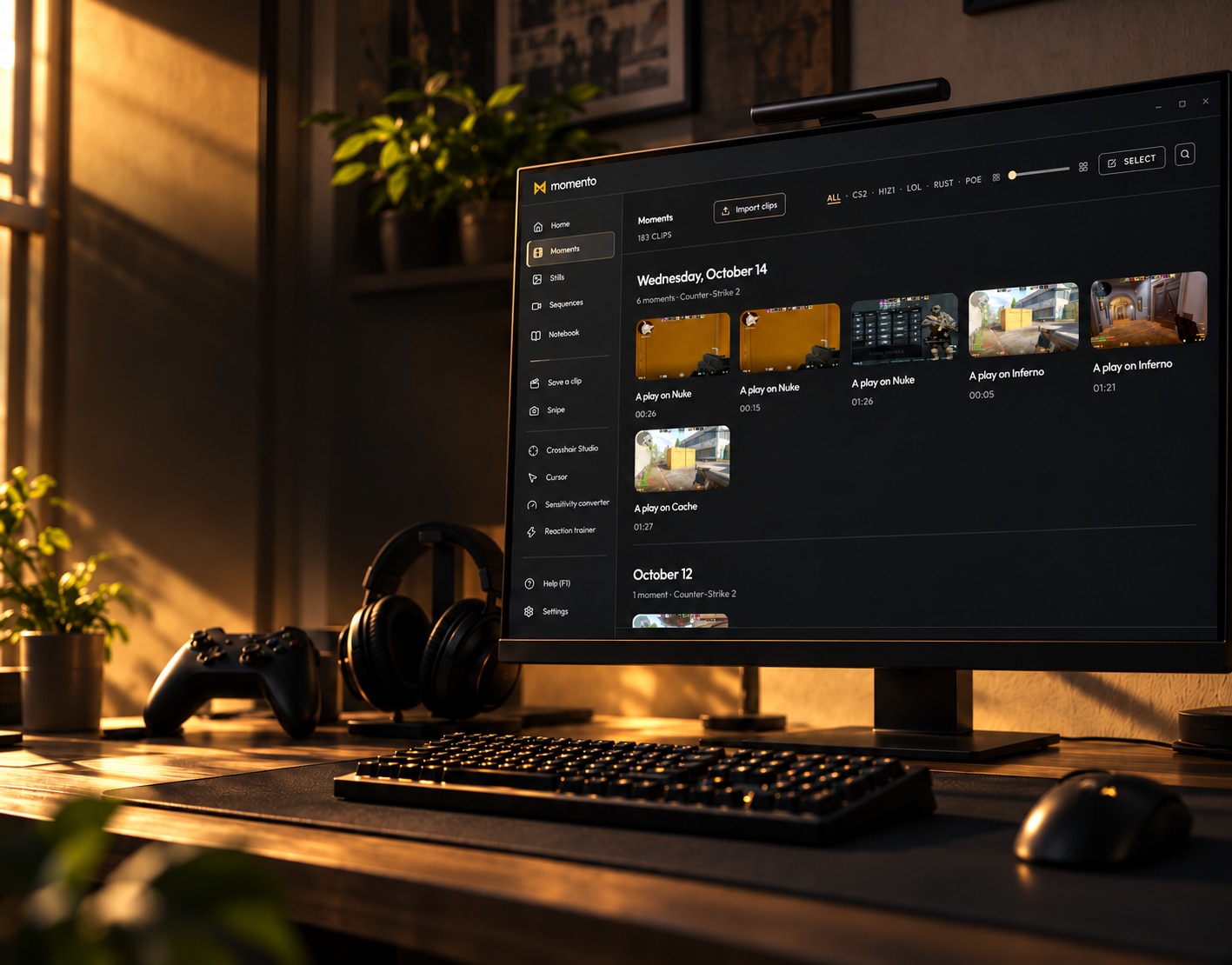
Keep the moment.
Short clips, longer sessions and a library to come back to.
MADE FOR YOUR TIME IN GAME
Keep the clips. Save the idea. Make the setup yours.
Capture, notes and player tools. One app for Windows 11.
MORE WAYS TO MAKE IT YOURS
Short clips, longer sessions and a library to come back to.
Builds, checklists and sketches, together in your Notebook.
Save a frame, annotate it, extract its text or translate on demand.
Try a reticle, a pointer or a sensitivity conversion. Take a quick reaction check.
THE MOMENTO COMMUNITY
Questions
Choose a topic, or search the questions.
A PC gaming toolkit for capturing, editing and organizing clips and screenshots, keeping build notes and using player tools. Clips, Stills, Notebook, Sequences, crosshairs and other tools share one app.
Save clips or longer recordings, edit clips and screenshots, extract or translate text on demand, keep notes and checklists, organize your library and try player tools. Automatic capture and event metadata depend on the game and integration. Sharing is a separate, voluntary action in the desktop app.
A one-time purchase has been the planned model. Final pricing, timing and distribution are still being finalized. This preview offers no purchase or download; follow the project on Discord for updates.
PC players who want to keep their moments and useful game notes together, with extra tools for their setup. Momento is designed around the individual player; use the parts that fit how you play.
Windows 11. No Mac or Linux version announced.
Use the clip shortcut configured in Settings while capture is running. Event-based automatic clips are available through specific game integrations; availability and reliability depend on the game. This browser preview does not capture your game.
While capture is active, the rolling buffer retains a limited amount of recent gameplay. Saving a clip can recover that recent window. It cannot recover footage from before capture started or outside the configured buffer.
The rolling clip buffer holds encoded packets in memory; saving a clip writes a video file. Long REC sessions write recordings to disk. App settings, caches and other files can also use disk space.
Yes, REC is the longer-session recording mode. Available event metadata depends on the game integration and the session; every recording is not guaranteed to contain match events.
You trim, you string several clips together, you line up your segments on a timeline and you export your edit — without opening third-party software. Enough to put out a clean mini-edit straight from Momento.
Instant capture, plus the Snipe tool to grab a precise area (it can replace the Windows tool). It all goes into the Stills tab, with a full editor: draw, text, blur, crop, magic wand, undoable history — and even translation of the text on screen.
Your gamer's notepad: builds, strats, crafting checklists, raid plans… in rich text, with a game tag. And you can pin your clips and captures in it — your notes and your moments are connected, not scattered.
A way to group your captures and moments into coherent series, to tell the story of a match or keep a progression tidy.
Yes. The library keeps everything in one place and stays searchable — by game, but also by weapon, map, champion or multikill type on supported games.
The product scope includes LoL, TFT, CS2, Dota 2 and Valorant, with other companion uses too. Capture, detection and structured events have different compatibility requirements. A game listed in Settings is not proof that its capture profile has been tested.
Compatibility has to be checked for the game, hardware and window profile. Broader multi-game support remains part of the direction, but there is no promise of universal automatic highlights or support for every game.
Game integrations can supply event names and tags. The result depends on the events actually available; ordinary or imported MP4 files may have no game metadata.
Momento uses Windows Graphics Capture without DLL injection or reading game-process memory. Those design choices do not establish a blanket anti-cheat guarantee. Compatibility needs evidence for the game and setup being used.
There is no blanket validation for all these anti-cheat systems. The design avoids injection and game-process memory access; actual compatibility still needs testing for each game and configuration.
A SmartScreen warning does not establish whether a file is safe. This preview provides no installer. For a future release, check the official distribution source and publisher information, and ask support if anything looks unexpected.
Capture and recording use resources. The impact depends on your GPU, game, resolution and recording settings. Hardware encoding is part of the design, but measured comparisons on specific setups are needed before making a performance claim.
No. Everything stays local on your PC by default. Nothing is put online unless you decide to — no hidden upload of your gameplay.
Creations and preferences stay on your PC by default, without automatic account cloud sync. Sharing by link uploads only the content you choose. Shared links have an expiry; this read-only tour does not create, change or publish content.
No. Momento is standalone: no account, no login. You launch the app and capture — everything stays local on your PC.
In the desktop app, choosing to share uploads the selected clip and creates a public web link. Recipients can open it in a browser; chat previews depend on the platform. Publishing is disabled in this demo.
Glyph is Momento’s private capture engine. It uses targeted Windows Graphics Capture, GPU processing and hardware video encoding. Performance and compatibility claims still require tests on specific setups.
Arbiter is the experimental multi-signal highlight work. It is disabled by default and is not a promise of universal automatic highlights. The paused ML-highlight work is separate from event-based game integrations and from translation you explicitly request.
An open format for attaching structured game events to standard MP4 video. When the source supplies events, compatible tools can use them to review and understand the session. Imported videos and captures without an integration may contain no such events.
Players can use their own clips and notes when discussing a match with friends or teammates. Momento’s current direction remains a personal PC toolkit; a professional team workspace, coaching service or account-based collaboration is not part of that promise.
Windows 11 and an NVIDIA, AMD or Intel GPU with compatible hardware encoding. Compatibility depends on your setup and game.
Resource use depends on which tools are enabled and what they are doing. Recording and language processing have different costs from browsing the library. No general lightweight or zero-impact benchmark is claimed here.
Update details will be announced at launch.
Browse the clips, play videos and discover the editor and Notebook in a read-only tour. Creation, changes, calculations and exports require the desktop app, coming soon.
The desktop app reads and translates images on your PC with its language pack. Text recognition and translation are unavailable in this read-only website tour.
Browse the user manual or join the Momento Discord to ask a question, report a bug or share feedback.